New Economical 4-channel Oscilloscopes GBS-1074, GBS-1104, GBS-1204
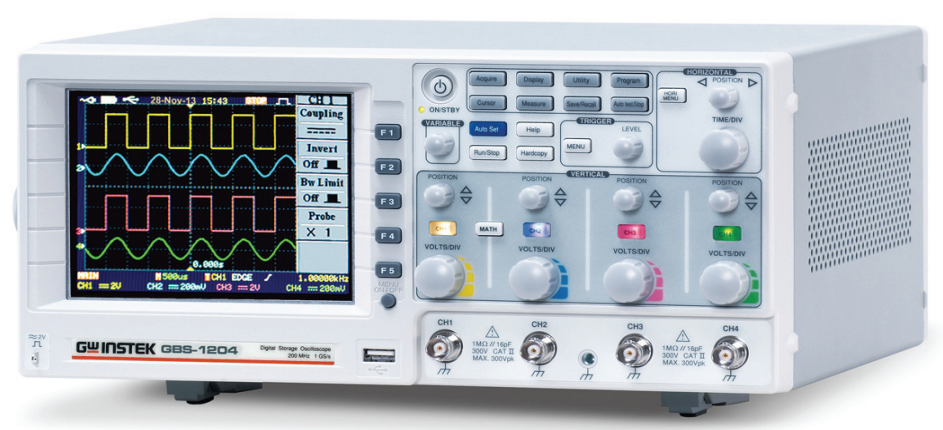
Posted on February 06 2014The GBS‐1000 series, an economical selection of the four‐channel DSO, offers three frequency ranges including 200,100, and 70MHz, real time sampling rate of 1 GSa/s, equivalent time sampling rate of 25GSa/s and 25k points memory depth.
The GBS‐1000 series has numerous features including 5.7” TFT color LCD display, 27 automatic measurements, FFT and FFTrms tests, 12‐graticule horizontal display, Go/NoGo for predefined conditions, and flexible interface selections such as USB and RS 232. By using the USB interface, users can save waveform images and waveform data as well as carry out waveform printout. The diversified features have made the
GBS‐1000 series the valuable choice of the economical four‐channel oscilloscope.
Signal Acquisition

The GBS‐1000 series features real time sampling rate of 1GSa/s and equivalent time sampling rate of 25GSa/s. The three built‐in signal acquisition methods are normal, peak detect and average. The flexible trigger type selections comprise edge, video (NTSC, PAL, SECAM) and pulse width. The trigger modes of edge and pulse include auto, normal and single.
25k Points Waveform Memory Depth
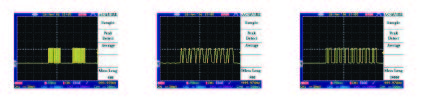
Oscilloscopes with long memory facilitate users to retrieve more waveform data in a certain period of time. The GBS‐1000 series, with 25k points memory depth, allows users to meticulously observe signals. Users, via the Acquire function of the GBS‐1000 series, can select 25k or 500 points memory depth to analyze complex waveforms or acquire fast updated waveforms.
Measurement Functions

The GBS‐1000 series provides 27 automatic measurement selections including voltage, period and time delay. Each channel can execute 5 measurement items simultaneously. 10 measurement results of two channels combined can be shown on the screen at the same time. All measurement results displaying on the screen allow users to efficiently observe all measurement parameters so as to better interpret
signals. Once the cursor function is on, the measurement target will be the signal within the cursor. After pressing Menu Off key, the measurement information will still be shown on the screen.
Complete vertical and horizontal expansion function
 |
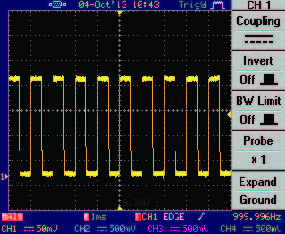 |
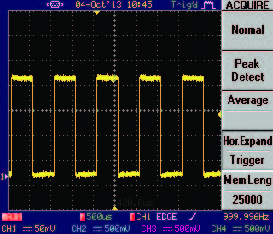
Users, via the GBS‐1000 series, can either select GND or the center of the signal to execute vertical expansion. Either the center of the signal or the vertical trigger point can be selected to carry out horizontal expansion. A sound signal expansion selection facilitates users to expand required signals for a detailed observation of signal trigger points.
Data Log
 |
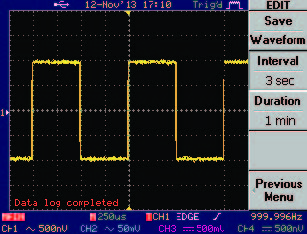 |
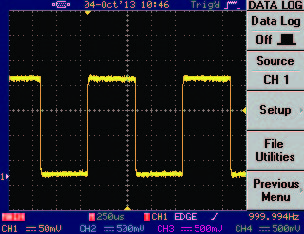
The data log function allows users to continuously record waveform data in a USB flash drive. After presetting time, interval and format for data recording the data log function will automatically record signals, which met trigger conditions. This function facilitates waveform recording for a long period of time that is beneficial to the observation and measurement result analysis afterwards.
Go/NoGo Test

The Go/NoGo function verifies whether or not the input signals are consistent with users’ preset conditions. Users have to preset waveform reference and signal conditions to activate Go/NoGo function and the Go or NoGo result will be shown on the screen instantly. Once the result is NoGo the GBS‐1000 will be sounding a buzz or sending out a control signal through the BNC output interface on the rear panel.
FAB Analyses
| Features | Advantages | Customer Benefits | |
| 1 | 25K Points Record Length | Longer memory depth produces signals in great detail. | With the same timeframe, users can acquire complete waveforms to ensure the integrity of signal tests. |
| 2 | Auto measurements | 27 diversified measurement selections facilitate users to obtain results easily. After activating the cursors function, users can freely select the desired signal measurement range. |
Diversified measurement selections produce measurement result in no time that greatly enhances test efficiency. |
| 3 | Complete vertical and horizontal expansion function | Users, based upon the requirements, can select GND or the center of the signal to vertically expand signals. The center of the signal or trigger point can be selected for horizontal expansion. | Users, by requirements, can precisely observe signals of any segment in detail to expedite signal analysis process via selecting either vertical or horizontal expansion. |
| 4 | Data Log | For analyzing waveforms and data afterwards, the data log function allows users to select required data recording time and interval, either waveform recording or data recording, or both. |
Either long waveform image recording or long data recording, or both facilitate observation and measurement result analysis afterwards. |
GBS‐1000 Features and Functions
Key Performance Specifications
- 200MHz/100MHz/70MHz Bandwidth Range
- 1GSa/s Real‐time Sampling Rate and 25k Points Memory Depth
- 25GSa/s Equivalent Time Sampling Rate
- 2mV /div to 5V/div of Vertical Range
- 1ns/div to 10s/div of Time Base Range
- 5.7 inch TFT LCD Display
- Data Log
Rich Features for Signal Analysis and System Debug
- Abundant Trigger Functions to Capture Demanded Signals
- 27 Automatic Measurement Functions offer Direct Measurement Readings
- FFT and FFTrms Computing Provides the Frequency Domain Analysis
Communication Interfaces and I/O
- Go/NoGo output
- USB host/device port
- RS232
Service Policy
- 3‐year warranty. The GBS‐1000 series oscilloscope with SMD design is a highly reliable product that carries a 3‐year warranty.
- Service Support. The service instructions in the Service Manual will help distributors repair
defective units promptly. Should the board replacement is necessary to fix the defective unit, the
board swapping service support is provided by Good Will Instrument to facilitate the repair jobs
done at the distributor’s site. - Firmware upgrade through Website. Good Will Instrument continues to provide the after sales
support through its website. The most updated version of firmware and PC software of GBS‐1000
series will be posted on Good Will Instrument Website at http://www.gwinstek.com for free
download via USB Flash Drive.
Specifications
| GBS‐1074 | GBS‐1104 | GBS‐1204 | |
| Vertical | |||
| Channels | 4 | 4 | 4 |
| Bandwith | DC ~ 70MHz (‐3dB) | DC ~ 100MHz (‐3dB) | DC ~ 200MHz (‐3dB) |
| Rise Time | 5 ns Approx. | 3.5ns Approx. | 1.75ns Approx. |
| Sensitivity | 2mV/div ~ 5V/div (1‐2‐5 increments) | ||
| Accuracy | ±(3% x |Readout|+0.05 div x Volts/div+0.8mV) | ||
| Input Coupling | AC, DC & Ground | ||
| Input Impedance | 1MΩ±2%, ~16pF | ||
| Polarity | Normal & Invert | ||
| Maximum Input | 300V (DC+AC peak), CATII | ||
| Waveform Signal Process | + , ‐ , X ,FFT ,FFTrms | ||
| Offset Range | 2mV/div ~ 20mV/div : ±0.5V 50mV/div ~ 200mV/div : ±5V 500mV/div ~ 2V/div : ±50V 5V/div : ±300V | ||
| Trigger | |||
| Bandwidth Limit | 20MHz (‐3dB) | ||
| Sources | CH1 , CH2 , CH3 , CH4 , Line | ||
| Types | Edge ,Video ,Pulse | ||
| Modes | Auto‐Level ,Auto, Normal, Single | ||
| Video trigger standard | SECAM ,PAL ,NTSC | ||
| Coupling | AC , DC , LF rej. , HF rej. , Noise rej. | ||
| Sensitivity | DC ~ 25MHz : Approx. 0.5div or 5mV 25MHz ~70/100/ 200MHz : Approx. 1div or 10mV | ||
| Horizontal | |||
| Range | 1ns/div ~ 10s/div (1‐2‐5 increments) ROLL : 250ms/div ~ 10s/div | ||
| Modes | Main, Window, Window Zoom, Roll, Scan, X‐Y | ||
| Accuracy | ±0.01% | ||
| Pre-Trigger | 20 div maximum | ||
| Post-Trigger | 1000 div | ||
| X-Y Mode | |||
| X‐Axis Input | Channel 1 | ||
| Y‐Axis Input | Channel 2 or Channel 3 or Channel 4 | ||
| Phase Shift | ±3° at 100kHz | ||
| Signal Acquisition | |||
| Real‐Time Sample Rate | 1GSa/s maximum | ||
| Equivalent Sample Rate | 25GSa/s maximum | ||
| Vertical Resolution | 8 Bits | ||
| Record Length | 25K Points maximum | ||
| Acquisition Mode | Normal, Peak Detect, Average | ||
| Peak Detection | 10ns | ||
| Average | 2 , 4 , 8 , 16 , 32 , 64 , 128 , 256 | ||
| Cursors and Measurement | |||
| Voltage Measurement | Vpp , Vamp , Vavg , Vrms , Vhi , Vlo , Vmax , Vmin , Rise Preshoot/Overshoot , Fall Preshoot/Overshoot | ||
| Time Measurement | Freq , Period , Rise Time , Fall Time , Positive Width , Negative Width , Duty Cycle | ||
| Delay Measurement | Eight types of delay measurement | ||
| Cursors Measurement | Voltage difference between cursors (ΔV) Time difference between cursors (ΔT) | ||
| Auto Counter | Resolution : 6 digits Accuracy : ±2% Signal Source: All available trigger source except the Video trigger mode | ||
| Control Panel Function | |||
| Autoset | Automatically adjusts Vertical VOLTS/DIV, Horizontal TIME/DIV, and Trigger level | ||
| Save Setup | Up to 20 sets of measurement conditions | ||
| Save Waveform | 24 sets of waveform | ||
| Display | |||
| TFT LCD Type | 5.7 inch | ||
| Display Resolution | 234 (Vertically) x 320 (Horizontally) Dots | ||
| Display Graticule | 8 x 10 divisions ; 8 x 12 divisions (menu off) | ||
| Display Brightness | Adjustable | ||
| Interface | |||
| Go/NoGo Output | 5V Maximum/10mA TTL Open Collector Output | ||
| RS‐232 Interface | DB 9‐pin male DTE RS‐232 interface | ||
| GPIB Interface (Option) | Fully programmable with IEEE 488.2 compliance | ||
| USB | USB Host/Device 2.0 full speed supported | ||
| Power Source | |||
| Line Voltage Range | AC 100V ~ 240V , 48Hz ~ 63Hz , Auto selection | ||
| Miscellaneous | |||
| Multi‐Language Menu | Available | ||
| Online Help | Available | ||
| Data Log | Available | ||
| Time Clock | Time and Date, Provide the Date/Time for saved data | ||
| Dimensions & Weight | |||
| 310(W) x 142(H) X 254(D)mm; Approx. 4.3kg | |||
Ordering Information
- GBS‐1074 70MHz, 4‐channel DSO
- GBS‐1104 100MHz, 4‐channel DSO
- GBS‐1204 200MHz, 4‐channel DSO
Includes Accessories:
- Quick Start Guide x1 , User Manual CD X1 , Power CordX1
- GTP‐070A‐4 : 70MHz (10:1/1:1) Switchable passive probe for GBS‐1074(one per channel)
- GTP‐100A‐4 :100MHz (10:1/1:1) Switchable passive probe for GBS‐1104(one per channel)
- GTP‐250A‐2 :250MHz (10:1/1:1) Switchable passive probe for GBS‐1204 (one per channel)
Free Download
- Driver: USB driver, LabView Driver


